View Issue Details
| ID | Project | Category | View Status | Date Submitted | Last Update |
|---|---|---|---|---|---|
| 0001591 | T99X171.00 SKB Eagle | xTS certification | public | 2022-12-28 08:15 | 2023-03-06 10:58 |
| Reporter | (ALTech) Younkwang Jung | Assigned To | (ALTech) Younkwang Jung | Due Date | |
| Priority | normal | Severity | s4-minor | Reproducibility | always |
| Status | closed | Resolution | fixed | ||
| Summary | 0001591: [Smart3[ATV12] Answers on how to enable CEC from Digicap | ||||
| Description | Hi Jason The answers I received from digicap are as follows https://jira.skbroadband.com/browse/FSTB12-23 If you change the properties below, it will be changed to using CEC. property : /btv_home/config/tvservice-system-properties.xml <entry key="PROPERTY_TV_POWER_CONTROL">1</entry> enable: 1, disable: 0 call API after change property mAVControlManager.getAVControlServiceDisplayOutput().setCECStatus(booleanValue) enable : true, disable: false I checked it , the permission of the file is tvservice-system-properties.xml (system level ) -rw-r--r-- 1 system system 11674 2022-12-28 03:47 tvservice-system-properties.xml com.android.tv.settings ( system level ) console:/btv_home/config # ps -A | grep com.android.tv.settings system 4145 3493 1328588 104476 SyS_epoll_wait 0 S com.android.tv.settings I think it's possible. please check it And please let me know if you have any other questions Thank you YK.Jung | ||||
| Tags | No tags attached. | ||||
| Attach Tags | |||||
| User List |
(ALTech) JunGyu Kim , (ALTech) SY Yoon , (SW) Kerwin Chen |
|---|
|
|
Hi YK, Is the mAVControlManager.getAVControlServiceDisplayOutput().setCECStatus Android Standard API? Our request is as follows, From Android 12, there are CEC/Passthrough in xTS auto test, we want to enable CEC/Passthrough at SKB login page Is any approach or standard api to enable CEC/Passthrough in GoogleTvSetting? Thanks, Jason |
|
|
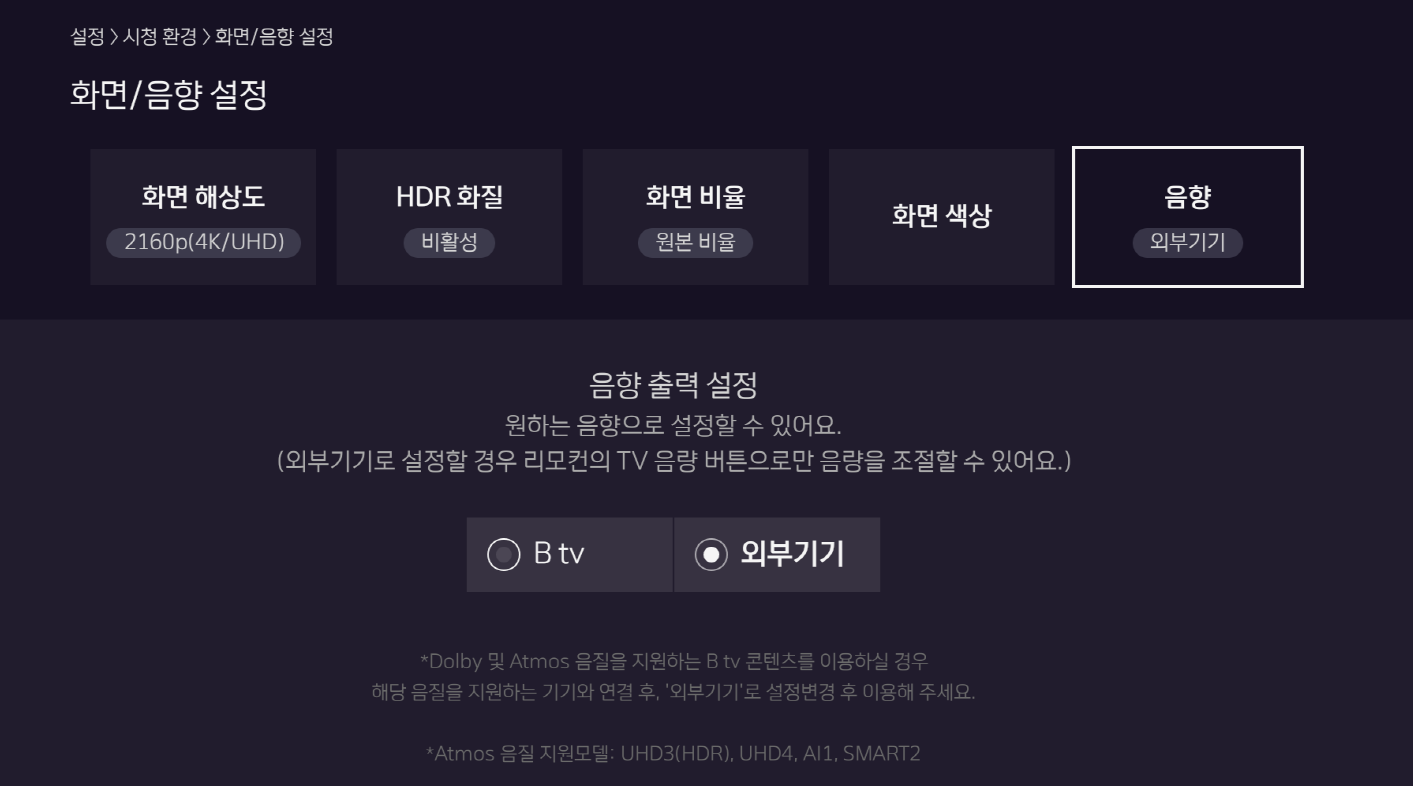
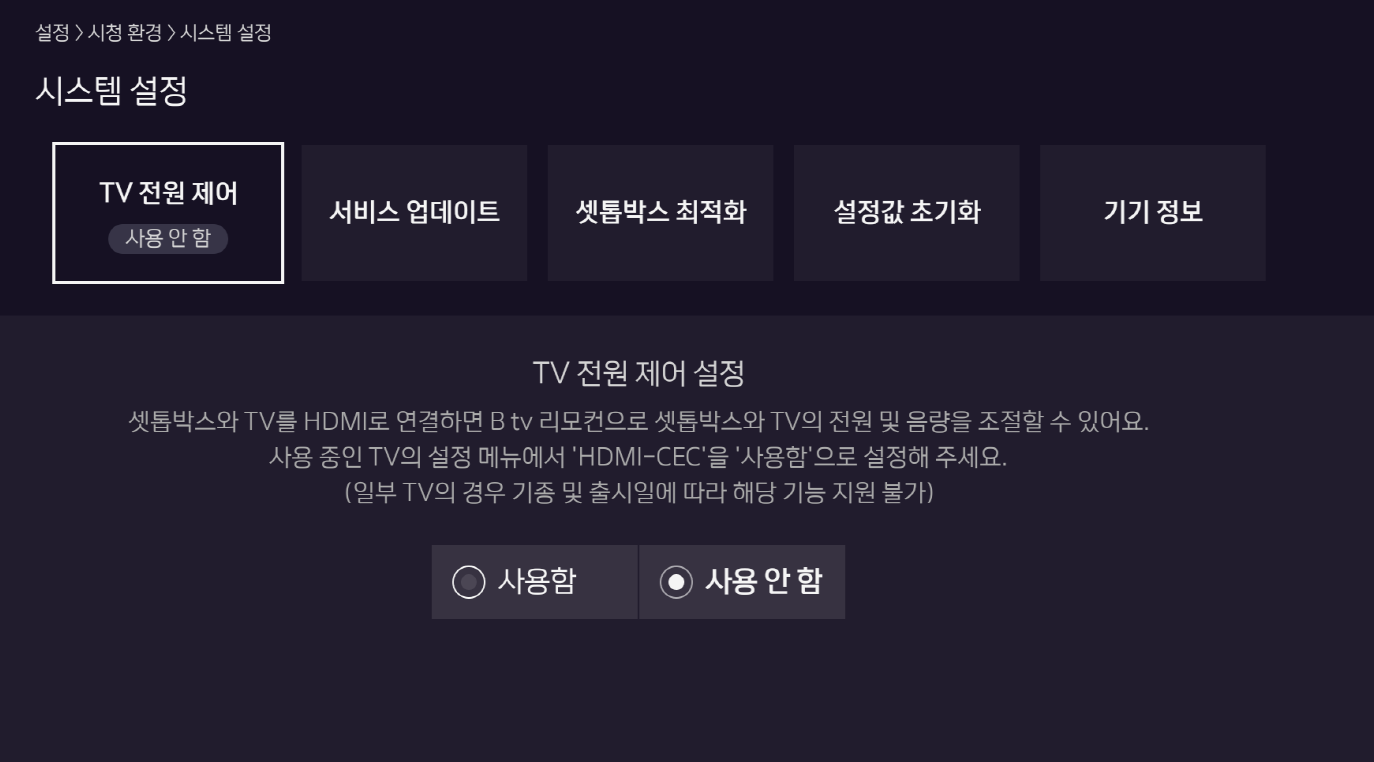
Hi Jason I received feedback from Digicap https://jira.skbroadband.com/browse/FSTB12-23 Digicap worked on it so that we can enter the two menus below with a hidden key at SKB login page It will be included in the app that will be released this Friday. 화면/음향 설정(음향): 우방향키(구리모컨: play) -> 7 -> 8 -> 9 -> 7 -> OK 시스템 설정(TV전원제어): 우방향키(구리모컨: play) -> 7 -> 8 -> 9 -> 8 -> OK Thank you YK.Jung |
|
|
Hi Jason I tested it with homeui that was released on Friday(1/13) , it work ok please use below hot key at IP setting menu 화면/음향 설정(음향): Blue (구리모컨: play) -> 7 -> 8 -> 9 -> 7 -> OK 시스템 설정(TV전원제어): Blue (구리모컨: play) -> 7 -> 8 -> 9 -> 8 -> OK Thank you YK.Jung |
|
|
Hi YK, I've verified the following key combinations 화면/음향 설정(음향): Blue (구리모컨: play) -> 7 -> 8 -> 9 -> 7 -> OK 시스템 설정(TV전원제어): Blue (구리모컨: play) -> 7 -> 8 -> 9 -> 8 -> OK It looks good to me. Thanks, Jason |
|
|
Hi YK, I've verified the following key combinations 시스템 설정(TV전원제어): Blue (구리모컨: play) -> 7 -> 8 -> 9 -> 8 -> OK Set audio setting to passthrough then reboot 시스템 설정(TV전원제어): Blue (구리모컨: play) -> 7 -> 8 -> 9 -> 8 -> OK the audio settings change to Btv the settings value of CEC also can NOT be kept after reboot device. Could you check it ? Thanks, Jason |
|
|
Hi Jason, Digicap fixed that the setting value of CEC can not be kept after reboot. Please check it with newest FW. Thank you. Kim |
|
|
Hi all, I've verified it this morning (2/6) It works fine. Thanks, Jason |
|
|
Hi all, I've verified it with 15.537.08 (verified on 2/13) This function is fail Thanks, Jason |
|
|
Hi Jason Digicap is saying that this code was not applied by mistake while releasing. A new homeUI will be released next Tuesday (2/21) and will be added to it. Thank you YK.Jung |
|
|
Hi Jason Please test this function with v15.537.14 version that will be built today. Thank you YK.Jung |
| Date Modified | Username | Field | Change |
|---|---|---|---|
| 2022-12-28 08:15 | (ALTech) Younkwang Jung | New Issue | |
| 2022-12-28 08:15 | (ALTech) Younkwang Jung | Status | new => assigned |
| 2022-12-28 08:15 | (ALTech) Younkwang Jung | Assigned To | => (SW) Jason Ling |
| 2022-12-28 08:15 | (ALTech) Younkwang Jung | Issue Monitored: (ALTech) SY Yoon | |
| 2022-12-28 08:15 | (ALTech) Younkwang Jung | Issue Monitored: (ALTech) JunGyu Kim | |
| 2022-12-30 16:53 |
|
Issue Monitored: (SW) Kerwin Chen | |
| 2022-12-30 16:58 |
|
Note Added: 0011614 | |
| 2022-12-30 16:58 |
|
Assigned To | (SW) Jason Ling => (ALTech) Younkwang Jung |
| 2023-01-05 20:18 |
|
Category | SW => xTS certification |
| 2023-01-11 14:40 | (ALTech) Younkwang Jung | Note Added: 0011741 | |
| 2023-01-11 14:40 | (ALTech) Younkwang Jung | File Added: image-2023-01-09-13-39-50-846.png | |
| 2023-01-11 14:40 | (ALTech) Younkwang Jung | File Added: image-2023-01-09-13-41-06-546.png | |
| 2023-01-16 09:39 | (ALTech) Younkwang Jung | Note Added: 0011783 | |
| 2023-01-16 09:39 | (ALTech) Younkwang Jung | File Added: RCU.PNG | |
| 2023-01-16 09:39 | (ALTech) Younkwang Jung | File Added: ip_setting_menu.PNG | |
| 2023-01-16 13:46 |
|
Status | assigned => resolved |
| 2023-01-16 13:46 |
|
Resolution | open => fixed |
| 2023-01-16 13:46 |
|
Note Added: 0011795 | |
| 2023-01-16 17:22 |
|
Note Added: 0011801 | |
| 2023-01-16 17:24 |
|
Note Edited: 0011801 | |
| 2023-01-16 17:27 |
|
Note Edited: 0011801 | |
| 2023-02-01 10:49 | (ALTech) JunGyu Kim | Note Added: 0011933 | |
| 2023-02-06 19:45 |
|
Status | resolved => closed |
| 2023-02-06 19:45 |
|
Note Added: 0012034 | |
| 2023-02-13 16:31 |
|
Status | closed => feedback |
| 2023-02-13 16:31 |
|
Resolution | fixed => reopened |
| 2023-02-13 16:31 |
|
Note Added: 0012151 | |
| 2023-02-17 10:35 | (ALTech) Younkwang Jung | Note Added: 0012220 | |
| 2023-02-22 14:31 | (ALTech) Younkwang Jung | Note Added: 0012311 | |
| 2023-03-06 10:58 |
|
Status | feedback => resolved |
| 2023-03-06 10:58 |
|
Resolution | reopened => fixed |
| 2023-03-06 10:58 |
|
Status | resolved => closed |